Most safety meetings fail before they begin—because they’re generic, repetitive, or disconnected from real worksite risks. Workers zone out, supervisors check boxes, and hazards slip through. But when you use targeted, up-to-date safety toolbox talk topics in PDF format, you turn routine conversations into actionable risk mitigation. These documents aren’t just handouts—they’re strategic tools that reinforce safety culture, support compliance, and adapt to evolving site conditions.
A well-structured safety toolbox talk topics PDF delivers focused, concise content that speaks directly to the job at hand. Whether you’re managing a construction crew, operating in manufacturing, or overseeing field service teams, the right PDF talks bridge the gap between policy and practice.
Let’s dive into how to build, source, and deploy effective safety toolbox talk topics in PDF format—so your meetings stick, resonate, and reduce incidents.
Why PDF Format Works for Toolbox Talks
The PDF isn’t accidental—it’s a functional choice. Unlike editable documents or slides, PDFs offer consistency, portability, and professionalism. They’re viewable on any device, printable for paper-based teams, and lock formatting so critical safety points aren’t lost in translation.
More importantly, PDFs support branding and standardization. When your company logo, contact info, and signature lines are embedded, the document feels authoritative. Workers are more likely to take it seriously when it looks like part of a formal safety program—not an afterthought.
Practical use case: A roofing crew downloads a PDF on “Working at Heights” before a morning meeting. The supervisor prints 10 copies, reviews key points (harness inspection, anchor points, weather risks), and has each worker sign the bottom. That signed PDF becomes part of the site's safety record—proving training occurred during an OSHA audit.
Core Elements of an Effective Safety Toolbox Talk PDF
Not all PDFs are created equal. A high-impact safety toolbox talk handout includes these non-negotiable components:
- Clear topic title (e.g., “Heat Stress Prevention” vs. “Safety Reminder #7”)
- Hazard overview – what can go wrong, and how often
- Real-world examples – incidents from similar sites or recent news
- Prevention strategies – specific actions workers can take
- Discussion prompts – 2–3 questions to spark dialogue
- Checklist or visual aid – e.g., PPE required, warning signs to watch for
- Sign-off section – for attendance and acknowledgment
Avoid the mistake of turning the PDF into a textbook. Bullet points beat paragraphs. One page is ideal—two pages max. If it takes longer than 10 minutes to read, it’s too long for a toolbox talk.
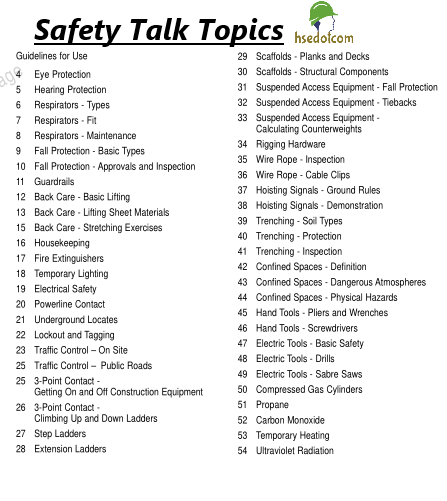
Common mistake: Including legal jargon or corporate policy language. Workers don’t need the full OSHA regulation verbatim—just the applicable takeaway. Say “Inspect ladders before use for cracks or loose rungs” instead of citing 29 CFR 1926.1053.
Top 10 High-Impact Safety Toolbox Talk Topics for PDFs
Choose topics that align with your site’s hazard profile. These 10 are proven to reduce incidents across industries:
1. Fall Protection Covers harness use, guardrails, ladder safety, and working near edges. Include a visual checklist for inspecting fall arrest systems.
2. Lockout/Tagout (LOTO) Focuses on energy isolation during maintenance. Use a flowchart: “Is the machine powered? → Yes → Follow LOTO steps.”
3. Hand and Power Tool Safety Highlight common risks: frayed cords, improper guards, using tools for unintended purposes.
4. Fire Prevention and Extinguisher Use Teach PASS method (Pull, Aim, Squeeze, Sweep) and when not to fight a fire.
5. Electrical Safety Discuss overhead lines, wet conditions, and PPE for live work—even for non-electricians.
6. Excavation and Trenching Stress the “cave-in” risk. Include soil type visuals and emergency rescue steps.
7. Hazard Communication (HazCom) Review SDS access, label reading, and proper storage of chemicals.
8. Slips, Trips, and Falls Often overlooked but among the top incident causes. Address housekeeping, footwear, and lighting.
9. Personal Protective Equipment (PPE) Go beyond “wear your gear.” Discuss fit, inspection, and limitations (e.g., gloves won’t stop all cuts).
10. Incident Reporting and Near Misses Encourage early reporting. Use a scenario: “You see a damaged scaffold—what do you do?”
Rotate these topics monthly or per project phase. A demolition job needs different talks than finishing work.
Where to Find Quality Safety Toolbox Talk Topics PDFs
You don’t have to create every PDF from scratch. Many organizations offer free, customizable templates. But not all sources are equal. Here are five reliable options:
| Provider | Strengths | Limitations |
|---|---|---|
| OSHA.gov | Free, compliant, authoritative | Generic formatting, limited visuals |
| SafetyNow | Industry-specific, editable PDFs | Subscription required for full access |
| Creative Safety Supply | Visual-heavy, bilingual options | Focused on manufacturing |
| SafetyCulture (iAuditor) | Mobile-friendly, cloud-based | PDFs are export-only from app |
| NASP (National Association of Safety Professionals) | Professionally designed, audit-ready | Membership or purchase needed |
Workflow tip: Download 5–10 base templates, then customize them with your company’s procedures, site photos, and job-specific risks. A template about “forklift safety” becomes more effective when it shows your warehouse layout.
Customizing PDF Talks for Real-World Use
A PDF about “noise exposure” means little to a crew that’s never had a noise survey. To increase relevance:

- Insert site-specific data – “Our readings in Area B hit 92 dB—above the OSHA limit.”
- Add photos – Show the actual machine, PPE, or hazard location.
- Link to procedures – Include QR codes that go to your internal LOTO or spill response plan.
- Translate when needed – Use bilingual PDFs if your team speaks multiple languages.
Example: A wastewater treatment plant uses a PDF on confined space entry. They modify it to include a photo of their primary vault, name the rescue team on call, and list the exact gas monitor model used onsite. Now it’s not just a talk—it’s a reference tool.
Avoid over-customizing, though. Don’t rewrite every sentence. Keep the core message intact and only adapt details that improve clarity or compliance.
Integrating PDF Talks into Your Safety Workflow
A PDF shouldn’t sit in a folder. Build it into your process:
- Schedule in advance – Plan topics for the month based on upcoming tasks.
- Distribute early – Email the PDF to supervisors 2 days before the meeting.
- Conduct the talk – Use the discussion prompts. Don’t just read it—engage.
- Collect sign-offs – Gather signatures and file digitally or physically.
- Review and rotate – Revisit high-risk topics quarterly, especially after incidents.
Pro tip: Store signed PDFs in a cloud folder with naming convention: “2024-04-15_TBT_Heat_Stress_JobSiteA.pdf”. This makes audits effortless.
Some companies mistake “having PDFs” for “having a safety program.” The document is only as good as the conversation it fuels.
Common Pitfalls to Avoid
Even well-designed PDFs fail when used poorly. Watch for these red flags:
- Using the same 5 topics all year – Workers disengage. Rotate and refresh.
- No follow-up – If you talk about ladder safety but never inspect ladders, the message is hollow.
- One-size-fits-all – A talk for electricians shouldn’t be used for forklift operators without adjustment.
- No accountability – Meetings without sign-offs are easy to ignore.
- Ignoring feedback – Ask workers: “Was this talk useful? What should we cover next?”
Real-world consequence: A crew had a PDF on “trench safety” but never enforced shoring. When a wall collapsed, OSHA cited them for “inadequate hazard control”—despite having the talk on file. The PDF wasn’t the problem. The lack of action was.
Final Word: Make PDF Talks Part of Your Safety DNA
Safety toolbox talk topics in PDF format aren’t just paperwork—they’re precision tools for risk reduction. When well-chosen, customized, and consistently used, they turn routine meetings into moments of real impact. They document compliance, spark dialogue, and—most importantly—prevent injuries.
Don’t settle for stale, off-the-shelf templates. Curate your library. Match talks to your site’s risks. Encourage discussion. And always, always follow through with action.
Download. Customize. Discuss. Sign. Repeat. That’s how safety becomes culture.
Frequently Asked Questions
What are the most common toolbox talk topics? Fall protection, PPE, LOTO, hand tool safety, and hazard communication top the list due to high incident rates.
Can I edit safety toolbox talk PDFs? Yes—many providers offer editable or customizable versions. Always review changes with your safety team.
How often should toolbox talks be held? Weekly is ideal, but at minimum, once per project phase or month. High-risk work may require daily talks.
Are toolbox talk sign-offs legally required? Not always, but they serve as proof of training during OSHA inspections and internal audits.
Should toolbox talks be in multiple languages? Yes, if workers aren’t fluent in English. Use bilingual PDFs to ensure understanding.
Do PDF toolbox talks replace formal training? No—they supplement it. Toolbox talks are brief reminders, not substitutes for certified training programs.
Where can I get free safety toolbox talk PDFs? OSHA.gov, NIOSH, and some safety suppliers (like Creative Safety Supply) offer free, downloadable PDFs.
FAQ
What should you look for in Safety Toolbox Talk Topics PDF Guide for Worksites? Focus on relevance, practical value, and how well the solution matches real user intent.
Is Safety Toolbox Talk Topics PDF Guide for Worksites suitable for beginners? That depends on the workflow, but a clear step-by-step approach usually makes it easier to start.
How do you compare options around Safety Toolbox Talk Topics PDF Guide for Worksites? Compare features, trust signals, limitations, pricing, and ease of implementation.
What mistakes should you avoid? Avoid generic choices, weak validation, and decisions based only on marketing claims.
What is the next best step? Shortlist the most relevant options, validate them quickly, and refine from real-world results.